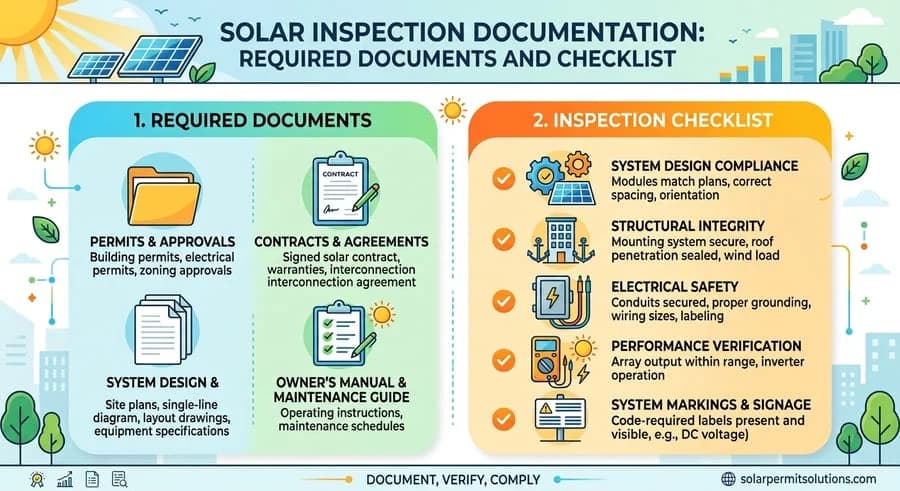
Solar inspection documentation is the set of plans, permits, equipment documents, and records that shows a solar PV project matches its approved design and meets the requirements of the applicable review. Most projects need an approved plan set, an electrical single-line diagram, equipment datasheets, and, when required, structural or engineering documents, plus separate paperwork for the utility. The exact list depends on the AHJ, the utility, and the project type.
Solar inspection documentation helps demonstrate that a solar photovoltaic (PV) project has the plans, technical information, permits, and records needed for the applicable review. Having the right documents organized can help project owners, installers, and designers identify missing information before submitting an application or responding to a review comment.
The documents required for a solar project depend on several factors, including the local authority having jurisdiction (AHJ), system design, project type, equipment, and stage of the approval process. A residential rooftop installation may have different documentation requirements from a commercial system or a ground-mounted solar array.
This guide explains the common documents associated with solar permitting and inspections, what each document is used for, how to organize your files, and how to address missing or outdated paperwork. If your installation is already complete and you want to understand the inspection process and what happens afterward, see our guide to solar inspection after installation.
Solar Inspection Documentation: Quick Reference
| Stage | Common Documents | Who Reviews It |
|---|---|---|
| Permit review | Permit application, approved plan set, single-line diagram, structural documents, equipment datasheets | AHJ (building or electrical department) |
| Field inspection | Approved plans, permit records, equipment documentation, labels, and equipment that match the plans | AHJ inspector |
| Corrections and reinspection | Correction notice, revised plans, records of completed corrections | AHJ |
| Utility interconnection | Interconnection application, utility forms, electrical diagrams, records of utility approval | Electric utility |
What Is Solar Inspection Documentation?
Solar inspection documentation is the collection of records used to describe a solar installation, support its technical design, demonstrate permit status, and document inspection results or other required approvals. Depending on the project and jurisdiction, this documentation may include:
- Solar permit applications and issued permits
- Approved solar plan sets
- Electrical single-line diagrams
- Structural calculations and engineering documents
- Solar module, inverter, battery, and racking specifications
- Manufacturer installation instructions
- Inspection reports and correction notices
- Revised plans and records of approved changes
- Utility interconnection forms and supporting documents
Not every project requires every item on this list. Some jurisdictions allow simplified permitting for qualifying systems, while others require additional drawings, calculations, forms, or professional engineering documents.
It is also important to distinguish between documents needed for permit review and records that may be requested during a later inspection or utility review. The U.S. Department of Energy describes permitting and inspection as two processes that must happen before a solar array can interconnect to the grid, with the utility approving interconnection afterward. The applicable AHJ and utility determine their respective requirements.
What Documents Are Needed for a Solar Inspection?
The exact documentation package depends on the project. The following documents are commonly associated with solar permitting, technical review, field inspection, or utility interconnection.
1. Approved Solar Permit Plan Set
The solar permit plan set describes the proposed installation and provides the technical information used during the review process. Depending on the system and local requirements, the plan set may include:
- Site plan showing the property and proposed array location
- Roof plan or ground-mount layout
- Solar module arrangement
- Electrical single-line diagram
- Inverter, battery, and other equipment locations
- Mounting and attachment details
- Structural calculations or engineering details, when required
- Applicable electrical and structural notes
- Required equipment labels and placards
Label documentation is a frequent source of review comments, so it helps to list each label, its wording, and its location. Our solar PV labeling requirements guide explains how to document a label schedule.
The plan set serves as an important reference for understanding the approved system design. For projects where the AHJ compares the completed installation with approved plans, discrepancies between the documents and the installed equipment may require clarification or revisions. For example, the approved plans may identify a particular inverter model, battery configuration, or array layout. If the design changes during the project, the responsible project team should determine whether revised plans or formal approval of the change is necessary.
Practical tip: Keep the current approved plan set separate from preliminary drawings and superseded revisions. This helps prevent the wrong version from being submitted or used as the project reference.
2. Solar Permit Application and Approval Records
Permit-related records establish the status of the project with the local permitting authority. Depending on the jurisdiction, these may include:
- Completed building or electrical permit application
- Permit number and project identification
- Issued permit or approval notice
- Approved drawings and supporting attachments
- Required declarations or local forms
- Applicable authorization or owner-related documents
A submitted application is not necessarily an issued permit. Likewise, a permit approval does not automatically mean that all later inspection or utility requirements have been satisfied.
Keep the permit number, property address, and project information consistent across the application and supporting documents. If a portal assigns a separate application number or revision number, retain that information for future reference.
3. Electrical Single-Line Diagram
An electrical single-line diagram (SLD) illustrates the main electrical components and connections within a solar installation. Depending on the system configuration, an SLD may identify:
- Solar PV array configuration
- Inverters
- Disconnects
- Electrical panels and points of interconnection
- Overcurrent protection
- Conductor and conduit information
- Grounding and bonding details
- Battery storage and associated equipment, when applicable
- Other relevant electrical components
The diagram helps reviewers understand how the solar system connects to the building’s electrical system. Electrical design is typically reviewed against the edition of the National Electrical Code (NFPA 70) that the AHJ has adopted. Where batteries are included, fire-safety standards such as NFPA 855 may also affect what documentation the AHJ requests.
The SLD should correspond to the project design and the equipment identified in the supporting documentation. If an inverter, battery, or electrical configuration changes, the responsible designer should determine whether the diagram needs to be revised. An outdated SLD can create confusion when the equipment list, plan set, and application describe different configurations.
4. Structural Calculations and Engineering Documents
Structural documentation supports the evaluation of the proposed mounting system and its connection to the roof, building, or ground-mount foundation. Depending on the project and jurisdiction, required information may include:
- Roof framing information
- Mounting and attachment details
- Structural calculations
- Applicable wind, snow, or seismic load information
- Roof or supporting-structure capacity evaluation
- Ground-mount post, footing, or foundation details
- Engineering letters or sealed calculations, when required
Load criteria for wind, snow, and seismic conditions are typically based on the ASCE 7 design load standard, as incorporated through the building code the AHJ enforces. Model building, residential, and fire codes are published by the International Code Council (ICC), and jurisdictions adopt them on different schedules.
The required level of structural documentation varies. Some jurisdictions permit qualifying projects to use simplified criteria or prescriptive methods, while other projects require project-specific calculations or engineering review. For example, a roof-mounted system may require information about the existing roof framing and proposed attachment method, while a ground-mounted system may require details about the posts, foundations, soil assumptions, or other structural elements.
If structural calculations or engineering documents are required, the project team should confirm which information the reviewing authority expects and whether a licensed professional must prepare or seal it. Our guide to PE stamp requirements by state explains how those thresholds differ. Do not assume that one project’s structural package will satisfy the requirements of another jurisdiction or installation.
5. Equipment Specifications and Manufacturer Documents
Equipment documentation identifies the products specified for the solar installation and provides relevant technical information. Depending on the project, this may include:
- Solar module datasheets
- Inverter datasheets
- Battery specifications
- Racking and mounting-system documentation
- Equipment certifications or listing information, when applicable
- Manufacturer installation instructions
- Product-specific structural or electrical information
These documents help establish which products are included in the design and provide technical details that may be needed during review. Our solar permit equipment guide lists equipment specifications and manufacturer datasheets among the core documents to keep on hand.
The equipment model numbers should be consistent with the permit plans and electrical diagrams. If the installer substitutes a different inverter, battery, module, or mounting system, the responsible team should determine whether the change affects the design documents or requires approval from the AHJ. For mounting systems, a general product brochure may not contain all the information needed for a structural review, so additional manufacturer documentation or project-specific engineering may be necessary.
Practical tip: Save the complete manufacturer datasheet or technical document that applies to the specified model, rather than relying only on a product webpage or marketing brochure.
6. Inspection Reports and Correction Records
Inspection records document the outcome of an inspection and any items that require follow-up. Depending on the local process, these records may include:
- Inspection result or status
- Correction notice or deficiency list
- Written comments from the inspector
- Revised plans submitted in response to a correction
- Records of completed corrections
- Reinspection results or approval confirmation
These records help the project team track outstanding items and understand which documents have been updated. If an inspector requests revised plans, retain the correction notice alongside the new submission so the revised documents can be connected to the specific issue being addressed. If the project requires a reinspection, keep the associated result or confirmation when it becomes available.
Many AHJs build their field checklists from public references. The IREC Model Inspection Checklist for Rooftop PV is one widely referenced example, although its published update reflects the 2017 NEC, so confirm the code edition your AHJ enforces today. Where an AHJ or utility offers virtual solar inspections, the records may be digital, so save those files with the rest of the project record. The specific forms and records provided will vary by AHJ.
7. Utility Interconnection Documents
Utility interconnection is generally a separate process from local building or electrical permit approval. The utility may require its own application, technical information, agreements, and supporting records. Depending on the utility and project, the documentation may include:
- Interconnection application
- Utility-specific forms or agreements
- System and equipment information
- Electrical diagrams
- Required attestations or supporting documents
- Records of utility review or approval
Some technical information may be used by both the AHJ and the utility, but the two processes do not necessarily have identical documentation requirements. For inverter-based systems, the technical baseline for interconnection is IEEE 1547. Check the utility’s instructions to determine which documents are required, when they must be submitted, and who is responsible for submitting them. Our solar interconnection agreement checklist and guide walks through the application side.
For more information about the sequence after installation, including the relationship between AHJ approval and Permission to Operate (PTO), read Solar Inspection After Installation: What Happens Next?
Solar Permit Solutions
Skip the Permit Headaches
We design plan sets that pass inspection the first time. Code-compliant, PE-stamped, accepted by AHJs nationwide.
Solar Inspection Documentation Checklist
Use this general checklist to organize the documents associated with a solar project. Not every item will apply to every installation.
| Document | Purpose |
|---|---|
| Permit application | Provides project information for the permitting authority |
| Issued permit and permit number | Records the permit status and identifies the project |
| Approved solar plan set | Documents the reviewed system design |
| Site plan or array layout | Shows the property, array, and equipment placement |
| Electrical single-line diagram | Describes the electrical configuration |
| Structural calculations or engineering documents | Supports structural review when required |
| Equipment datasheets | Identifies the specified products and technical details |
| Manufacturer installation documents | Provides product-specific installation information |
| Revised plans, if applicable | Records changes to the documented design |
| Inspection report or correction notice | Documents inspection findings |
| Correction or reinspection records | Tracks follow-up and inspection results |
| Utility interconnection forms | Supports the separate utility process |
Use the AHJ’s current permit checklist and the utility’s instructions to confirm the actual requirements for your project. This checklist is a general reference, not a substitute for jurisdiction-specific instructions.
How to Organize Solar Inspection Documents Before Submission
Having the right documents is only part of the process. They should also be accurate, easy to identify, and consistent with one another.
Confirm the Required Documents
Start with the current instructions from the AHJ or permitting portal. Identify which documents are required for the specific application, revision, or inspection stage. Do not assume that a checklist from another city or county will apply to your project. Research from the National Laboratory of the Rockies (formerly NREL) notes that review and approval across roughly 20,000 jurisdictions and 3,000 utilities can sometimes add weeks or months to an installation, and differing document requirements are part of that variation.
Some jurisdictions use streamlined programs. SolarAPP+ issues an instant permit and an inspection checklist for compliant systems, and the SolSmart National Simplified Solar Permitting Guide describes a simplified format that local governments and contractors can use for simple PV and PV plus storage projects. If the utility has a separate interconnection process, review its document requirements independently.
Make Sure the Documents Describe the Same System
Review the project information across the plan set, SLD, equipment datasheets, and application. Check that important details are consistent, including:
- Project address
- Permit or application number
- Module and inverter models
- Battery configuration, if applicable
- System layout
- Relevant equipment ratings
- Drawing revision dates
If the documents conflict, determine which information is correct and whether the affected files need to be updated before submission. Before the inspector arrives, you can also run through our solar panel inspection checklist to compare the finished installation with the paperwork.
Use Clear File Names
Clear file names make it easier to locate the correct document and identify its purpose. For example:
- ProjectAddress_ApprovedPlanSet.pdf
- ProjectAddress_ElectricalSLD.pdf
- ProjectAddress_StructuralCalculations.pdf
- ProjectAddress_InverterDatasheet.pdf
- ProjectAddress_InspectionCorrectionNotice.pdf
These are suggested naming conventions, not formal code requirements. Use the naming or upload conventions required by the relevant portal when applicable.
Keep Approved and Revised Documents Separate
Avoid treating preliminary drawings, submitted revisions, and approved plans as interchangeable. Maintain a clear record of which version was submitted, which version was approved, and whether a newer revision is under review. This is especially important when changes affect the array layout, equipment models, electrical design, or structural details.
Follow the Portal’s Submission Instructions
Before uploading, check the portal’s requirements for file formats, file-size limits, signatures, document categories, and revision procedures. Some portals require documents to be uploaded into separate categories. Others may require a complete revised package or specific forms. After submission, retain the confirmation or record that identifies what was uploaded. This helps the project team track the latest submission and respond to follow-up requests.
Common Solar Inspection Documentation Mistakes
Documentation issues can delay a review even when the underlying problem is simply missing, outdated, or inconsistent information.
Submitting an Incomplete Plan Set
A required drawing, calculation, attachment, or supporting document may be missing. How to address it: Compare the files against the current AHJ checklist and confirm that all applicable documents are included.
Uploading Outdated or Conflicting Plans
A project folder may contain multiple drawing versions, and the wrong one may be submitted. How to address it: Identify the current version and retain a clear record of superseded documents. Follow the AHJ’s instructions for replacing or revising an approved plan set.
Missing Equipment Datasheets
The reviewer may not have enough information to identify the specified product or evaluate its relevant technical characteristics. How to address it: Obtain the correct manufacturer documentation for the model identified in the design and confirm that it matches the plans.
Using an Electrical Diagram That Does Not Match the Design
The SLD may identify equipment or electrical connections that differ from the rest of the submitted package. How to address it: Have the responsible designer review the discrepancy and update the applicable documents as necessary.
Missing Required Engineering Documents
Some projects require structural calculations, attachment details, or engineering documentation that is not included in the submission. How to address it: Confirm the specific requirement with the AHJ and the responsible design professional. Determine whether existing documents are sufficient or additional calculations are needed.
Confusing Permit Approval With Inspection or Utility Approval
Permit approval, inspection approval, and utility authorization are distinct milestones. Completing one does not automatically establish that all other requirements have been satisfied. How to address it: Track each approval separately and confirm the outstanding requirements with the responsible authority or utility.
For issues involving the installation itself rather than missing paperwork, see our guide to why solar inspections fail.
What Should You Do if Solar Inspection Documents Are Missing or Need Revision?
If the AHJ, engineer, installer, or utility identifies missing or incorrect documentation, start by determining exactly what is being requested. Follow these steps:
- Identify the request. Read the correction notice, reviewer comment, or portal message carefully.
- Confirm who needs the document. Determine whether the request comes from the AHJ, utility, engineer, or another project participant.
- Identify the required change. The issue may involve a missing attachment, incorrect equipment information, a revised diagram, or additional engineering documentation.
- Contact the responsible professional. Ask the designer, engineer, installer, or project coordinator to prepare or obtain the required information.
- Submit the corrected documents. Follow the portal’s instructions and make sure the revised files are clearly identified.
- Keep a record. Save the revised documents, submission confirmation, and any subsequent response.
A documentation correction does not necessarily mean the physical installation is defective. In some cases, the records simply need to be completed or updated to accurately represent the project. However, if the documents reveal a design discrepancy or a difference between the approved plans and the installed system, the project team should determine whether additional design work, field corrections, or formal approval is required. For a step-by-step approach to building a clear response, see our guide on how to respond to solar permit corrections.
Get Your Solar Documentation Right Before the Inspection
Preparing accurate solar permit documents requires coordination between the project design, equipment specifications, electrical diagrams, and any structural information required for the installation. Most documentation problems come down to the same thing: the documents do not describe the same system, or they do not describe the system that was actually installed. A short consistency review before every submission catches most of them.
Solar Permit Solutions provides permit-ready plan sets, engineering support, and plan revisions for projects that need professional documentation. The services required depend on the project scope and applicable AHJ requirements. If your project has missing documents, conflicting drawings, or a request for revised plans, explore our solar permit design services, including residential solar design, or submit your project to discuss the requirements and determine whether we can help.
Frequently Asked Questions
Is a single-line diagram required for every solar inspection?
A single-line diagram is commonly included in solar permit documentation, but requirements vary by jurisdiction and project type. Confirm with the AHJ whether an SLD is required for your specific submission or inspection, and make sure it matches the installed equipment.
Do solar inspections require structural calculations?
Not every project requires the same structural documentation. Some jurisdictions allow qualifying systems to use simplified or prescriptive criteria, while others require project-specific calculations or engineering documents. Confirm the applicable requirements, and whether a licensed professional must seal the documents, before submitting the package.
Skip the Permit Headaches
We design plan sets that pass inspection the first time. Code-compliant, PE-stamped, accepted by AHJs nationwide.
Frequently Asked Questions
Common documents include the approved plan set, an electrical single-line diagram, equipment datasheets, and structural calculations or engineering documents when required. Permit records, correction notices, and utility interconnection paperwork may also apply. The exact list depends on the AHJ, the utility, the project type, and the stage of review.
Generally, yes. Most jurisdictions require a permit, and plan approval, before installation begins, and the final inspection compares the installed system with the approved plans. Requirements and exceptions depend on the jurisdiction and project, so check the permit record and the AHJ's instructions to confirm which plans apply.
Equipment datasheets and manufacturer documents are commonly part of the permit package and are useful to have available at inspection. Keep the complete datasheet for each specified module, inverter, battery, and mounting system, and make sure the model numbers match the approved plans.
Compare the installed equipment with the approved documents and consult the AHJ or the responsible design professional. Depending on the change, revised plans or formal approval may be necessary before the inspection.
Utility interconnection is generally a separate process, although some of the same technical information may be used in both reviews. The utility determines its own application and supporting-document requirements, so review its instructions independently.
Start with the AHJ's current checklist, confirm that the plan set, single-line diagram, datasheets, and application describe the same system, use clear file names, and keep approved, revised, and superseded versions separate. Follow the portal's upload instructions and save the submission confirmation.
Depending on the jurisdiction and utility, the project may need inspection approval, completion of any corrections or documentation, and completion of the utility interconnection process before Permission to Operate is granted. Do not turn on a grid-connected system until the utility authorizes operation.

SPS Editorial Team
Solar Permit Solutions
Solar Permit Solutions provides professional solar permit design services for residential, commercial, and off-grid installations across all 50 states. Our team ensures permit-ready plan sets delivered fast.
Related Articles
AC vs DC Coupled Solar Batteries: Which Should You Choose?
AC vs DC coupled solar batteries compared: efficiency, costs ($8K-$18K), and ins...

How Many Solar Panels Do I Need to Run Off the Grid?
Most off-grid homes need about 8 to 16 solar panels rated at 400 watts, dependin...
Solar Battery Permit Requirements: What You Need to Know
A solar battery usually needs local approval and a utility review before it can ...