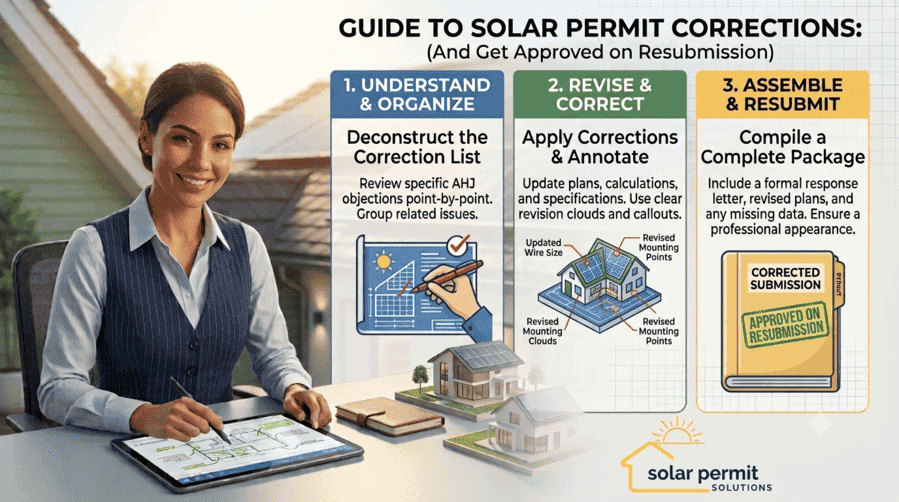
To respond to a solar permit correction, read every comment from every reviewing department, build a response matrix that answers each point with the exact NEC section or drawing sheet it fixes, revise and re-stamp the affected documents, and resubmit through the same channel you used the first time. Most solar corrections resolve in a single resubmission when the response matrix is complete and every revised sheet is clearly marked.
A correction notice is not a rejection. It’s the AHJ‘s way of telling you exactly what stands between your project and an issued permit. The problem is that solar corrections come with their own vocabulary, NEC article numbers, rapid shutdown labeling language, and 120 percent busbar math that a generic building permit response letter doesn’t cover. This guide walks through the actual response process step by step, including what a solar-specific response matrix should look like, how SolarAPP+ corrections work differently from a manual plan review, and when a revised sheet actually needs a fresh PE stamp.
What Counts as a Solar Permit Correction?
A correction notice, sometimes called a redline, a plan check comment, or a hold letter depending on the jurisdiction, is a formal list of items the reviewer needs fixed before they’ll issue the permit. It isn’t a denial. Reviewers use corrections for everything from a missing equipment datasheet to a genuine code violation, and the two call for very different responses.
Most solar corrections fall into a handful of buckets: missing or incomplete documentation, an outdated NEC edition reference, a labeling or rapid shutdown gap, a structural calculation question, or a site plan that doesn’t match satellite imagery or GIS records. If you want the full list of what typically triggers these in the first place, our guide on common mistakes when applying for solar permits breaks that down. This article picks up from there and focuses on what to actually do once the correction notice is sitting in your inbox.
The Solar Permit Correction Response Process, Step by Step
Step 1: Read Every Comment From Every Department Before You Touch a Drawing
Solar permits often get reviewed by more than one discipline, building, electrical, fire, and sometimes zoning, each producing its own set of comments. It’s tempting to jump straight to the electrical comments since that’s usually where the technical meat is, but skipping a two-line fire department comment about access pathway width is exactly what triggers a second review cycle even after everything else is fixed.
Read the whole notice first, cover to cover, before you open your design software. Note which comments are informational (the reviewer wants clarification), which require a drawing change, and which require a new calculation or a new PE stamp. This sorting step is what determines how long the fix will actually take.
Step 2: Build a Response Matrix
The single document that most affects whether your resubmission clears in one pass is the response matrix. This is a table, not a paragraph, that maps every reviewer comment to a specific, citable response tied back to the applicable NEC section. A vague answer like “see revised drawings” gives the reviewer nothing to check against and is one of the fastest ways to earn a second correction round.
A solar-specific response matrix should look something like this:
| Item # | Department | Reviewer Comment | Your Response | Sheet Reference |
| 1 | Electrical | RSD placard doesn’t identify shutdown type per NEC 690.12(D) | Revised placard text specifies array-and-conductors shutdown per installed configuration | E-201, Detail 3 |
| 2 | Electrical | 120% busbar calculation missing panel busbar rating | Calculation added referencing 200A busbar per panel datasheet, confirming NEC 705.12(B)(2) compliance | E-100, Calc 2 |
| 3 | Structural | Rafter spacing on drawing doesn’t match site photos | Rafter spacing corrected to 24 in. o.c. per verified attic photos; load calc updated accordingly | S-101, S-201 |
| 4 | Building | NEC edition on cover sheet lists 2020; jurisdiction enforces 2023 | Cover sheet updated to reference NEC 2023 Article 690 and 705 throughout | Cover Sheet |
Every citation should point to the specific NEC section, IFC reference, or manufacturer spec backing up the fix, not just “corrected as requested.” Reviewers move through dozens of these a week, and a matrix that lets them verify a fix in ten seconds is the difference between an approval and another round of questions.
Step 3: Revise the Actual Documents, With Engineering Sign-Off Where It’s Needed
Once you know what has to change, the revision itself usually touches one of three documents: the single-line diagram, the structural calculations, or the site plan. If the correction involves conductor sizing, the 120 percent rule, or rapid shutdown wiring, that’s a single-line diagram revision. If it involves rafter spacing, snow or wind load, or attachment hardware, that falls under structural engineering requirements for rooftop solar.
Any revision touching a PE-stamped calculation needs to go back through the engineer who stamped it, or an engineer licensed in that same state if the original one is unavailable. Don’t just redline the drawing and leave the old stamp in place. An unrevised stamp on a revised calculation is its own correction waiting to happen.
Step 4: Mark Up the Revised Sheets So the Reviewer Can Find the Change
Reviewers should never have to compare an old and new drawing side by side to figure out what moved. Cloud every area that changed on each affected sheet, add a numbered revision triangle next to each cloud, and update the revision block in the title block with the date and a short description, for example “Rev 1, response to plan check comments dated [date].”
Some jurisdictions, like Seattle, handle this electronically and expect responses embedded directly in the reviewer’s markup tool, following a documented process for how to respond to review comments. Others still expect a printed or PDF response letter alongside a clean, unmarked set for their records. Check your specific AHJ’s format before assembling the final package, since submitting in the wrong format can delay the review before anyone even reads your fixes.
Step 5: Reassemble the Complete Resubmittal Package
A complete solar correction resubmittal typically includes the response matrix at the front, the marked-up drawing set showing every change, a clean set if the AHJ requires one separately, and any updated calculations or equipment datasheets tied to a correction item. Our complete guide to solar permit applications covers what a first-time submission needs; a resubmittal package should mirror that same completeness standard, just scoped to the items that changed.
Don’t submit a partial set. Most AHJs won’t review a single corrected sheet in isolation. They want the full, current plan set uploaded together so nothing gets missed during re-review.
Step 6: Resubmit Through the Correct Channel and Follow Up
Some jurisdictions require resubmission through the same online portal used for the original application; others still take paper or PDF resubmittals in person. The City of Alameda, for example, publishes specific formatting rules for plan check resubmittals, including that every supporting document has to be its own separate PDF rather than a combined upload. Getting this wrong adds a delay before the technical review even restarts.
After resubmitting, streamlining your permit processing workflow means checking the portal or calling the reviewer proactively rather than waiting for a status email that may never come. Many jurisdictions post correction results to a portal without any outbound notification, so if you’re only checking once a week, you can lose several days before you even know a comment was posted.
How SolarAPP+ Corrections Work Differently
If your jurisdiction uses SolarAPP+, corrections don’t come from a human reviewer; they come from the platform’s automated code compliance check flagging a specific data field. The Department of Energy’s SolarAPP+ program runs submitted system data against NEC, fire, and structural rules in real time, which means a “correction” here is usually a missing or inconsistent data field rather than an ambiguous reviewer judgment call.
The fix is almost always in the data entry, not the design itself: a mismatched inverter model number between the one-line and the equipment field, an Isc value that doesn’t match the module datasheet, or a busbar rating entered incorrectly. Because there’s no human reviewer to call, double-check every field against the actual equipment cut sheet before resubmitting rather than assuming the flagged value is wrong. SolarAPP+ corrections typically clear the same day once the data is fixed, since the review itself is instant.
Solar Permit Solutions
Skip the Permit Headaches
We design plan sets that pass inspection the first time. Code-compliant, PE-stamped, accepted by AHJs nationwide.
Common Solar-Specific Correction Categories and How to Answer Them
A few categories show up across almost every jurisdiction. Knowing the pattern ahead of time makes the response matrix faster to write.
| Correction Category | What the Reviewer Is Checking | How to Respond |
| Rapid shutdown labeling | Whether the placard text, color, and roof diagram match NEC 690.12(D) for the installed shutdown type (see our rapid shutdown compliance guide) | Cite the exact label wording and the manufacturer’s rapid shutdown method by name, not a generic “complies with 690.12” note |
| 120% busbar rule | Whether the combined main and solar breaker rating exceeds 120% of the busbar rating per NEC 705.12 (see our supply-side vs. load-side guide) | Show the calculation using the busbar rating from the panel datasheet, not the main breaker rating |
| Equipment labeling | Whether placards, disconnect labels, and DC conduit markings match NEC Article 690 Part VI (see our labeling requirements guide) | Attach the full label schedule with exact wording and code section per label, specifying UL 969-rated label stock |
| Structural or fire code references | Whether the design matches the fire setback and structural provisions in the adopted code edition | Cite the specific edition your AHJ has adopted and update the cover sheet if the wrong one was referenced |
| Interconnection documentation | Whether the interconnection method complies with anti-islanding and utility disconnect requirements | Reference the specific utility tariff or compliance certificate for the installed inverter model |
For the full technical background behind these categories, see our guides on solar PV labeling requirements, rapid shutdown compliance, and supply-side versus load-side interconnection. Fire and structural code questions typically trace back to whichever edition your jurisdiction has adopted from the International Code Council, and interconnection labeling questions often come down to IEEE 1547 anti-islanding compliance documentation for the specific inverter model on the plan. When a labeling correction cites durability or weather resistance, specifying UL 969-rated label stock in the response matrix heads off a repeat comment on the next inspection.
Do You Need a New PE Stamp on a Revised Solar Plan?
Not every correction requires a new stamp, but any revision that changes a stamped calculation does. A wording fix on a cover sheet or an updated label schedule usually doesn’t need re-engineering. A revised rafter spacing calculation, a changed string configuration that affects voltage drop, or an updated busbar calculation almost always does, since the engineer’s stamp certifies that specific calculation, not the drawing set as a whole.
Whether the AHJ will accept a digital stamp on the resubmittal or wants a fresh wet stamp varies by jurisdiction. Our breakdown of PE stamp versus wet stamp requirements covers which is accepted where. If your original PE stamp came from an out-of-state engineer, that’s its own correction. The state-by-state PE stamp requirements guide lays out the licensing threshold and cost range for getting a properly licensed engineer to re-stamp the specific pages that changed. DSIRE is also a reliable source for confirming a state’s current code adoption status if the correction hinges on which edition applies.
How Long Do Solar Permit Corrections Take to Resolve?
A single, well-documented correction cycle typically adds one to four weeks to a project, depending on how quickly the AHJ re-reviews resubmittals. Our state-by-state solar permit timeline analysis shows this pattern clearly: jurisdictions with digital portals and dedicated solar review staff often turn around a resubmission in days, while paper-based departments can take just as long on the second look as they did on the first.
In practice, at least one round of corrections is closer to the norm than the exception on solar permit submittals, especially given how much solar-specific code language, from rapid shutdown labeling to the 120 percent busbar rule, trips up reviewers who are used to general building permits. Budgeting a buffer for at least one round of corrections when you quote a project timeline to a customer will save you from an awkward conversation later.
Mistakes That Turn One Correction Into Three
- Answering only the comments you agree with and ignoring the ones that seem minor. A missed two-line comment from any department restarts the whole review.
- Writing “see revised drawings” instead of citing the specific sheet, detail number, and code section that resolves each item.
- Forgetting to update every place a change appears. If you revise the single-line diagram but not the equipment schedule referencing the same inverter, the two documents will contradict each other on re-review.
- Leaving an old PE stamp on a page that’s since been revised without engineering sign-off.
- Resubmitting to the wrong portal, format, or department, which can delay the technical review before it even restarts.
- Treating an unpermitted or partially corrected system as good enough to install. Skipping the correction cycle entirely carries the same risk as installing without a permit in the first place, including a failed final inspection, forced changes after the fact, and a system that can’t get permission to operate.
When to Bring In a Permit Expediting Service
If you’re managing corrections across more than one or two jurisdictions at a time, the coordination overhead—tracking which reviewer wants what format, which state requires a re-licensed PE stamp, and which platform needs a data fix versus a redesign—adds up fast. Our overview of solar engineering requirements for permits covers what reviewers are actually checking for at a technical level, which is worth reading before you take on correction responses in-house.
Solar Permit Solutions handles AHJ plan check corrections as part of our permit filing and interconnection support, reviewing every comment line by line, coordinating PE-stamped revisions where needed, and managing the resubmission directly with the reviewer so a correction notice doesn’t sit unanswered while a project stalls.
Frequently Asked Questions
Do I need a new PE stamp to respond to a correction?
Only if the correction changes a stamped calculation, such as a structural load calculation, a string voltage calculation, or a busbar rating calculation. Cosmetic fixes like a corrected label or an updated cover sheet note usually don’t require re-engineering, but any calculation change should go back through a licensed engineer before resubmission.
Skip the Permit Headaches
We design plan sets that pass inspection the first time. Code-compliant, PE-stamped, accepted by AHJs nationwide.
Frequently Asked Questions
A correction notice, also called a redline, plan check comment, or hold letter, is a formal list of items an AHJ reviewer needs fixed before issuing your permit. It typically comes organized by reviewing department (building, electrical, fire) and isn't a rejection; it's a roadmap for what to fix before resubmitting.
Most jurisdictions don't set a hard deadline, but permits often expire if left inactive for 90 to 180 days without a response, and some AHJs charge a resubmission penalty after a set window. Check your specific jurisdiction's permit expiration policy, and respond as soon as possible since utility interconnection and installation scheduling both depend on the permit being active.
No. A correction notice means the reviewer found specific items that need to change before they can approve the permit. Outright denials are rare and usually reserved for projects that violate zoning or can't meet code at all. The vast majority of solar permits go through at least one correction cycle before approval.
A response matrix is a table that maps every reviewer comment to a specific, citable fix and the sheet where it's shown. It isn't legally required in most jurisdictions, but reviewers rely on it to verify your corrections quickly, and a resubmittal without one is far more likely to trigger a second round of questions.
SolarAPP+ corrections come from an automated code compliance check flagging a specific data field, not a human reviewer's judgment call. The fix is almost always a data entry correction, like a mismatched equipment model number or an incorrect busbar value, and once corrected, SolarAPP+ typically reissues the permit the same day.
The permit stays in limbo and eventually expires in most jurisdictions, which means starting the application over from scratch. If installation proceeds anyway without an approved permit, the project carries the same risks as any unpermitted system: failed final inspection, forced corrections after the fact, and an inability to secure permission to operate from the utility.

SPS Editorial Team
Solar Permit Solutions
Solar Permit Solutions provides professional solar permit design services for residential, commercial, and off-grid installations across all 50 states. Our team ensures permit-ready plan sets delivered fast.
Related Articles
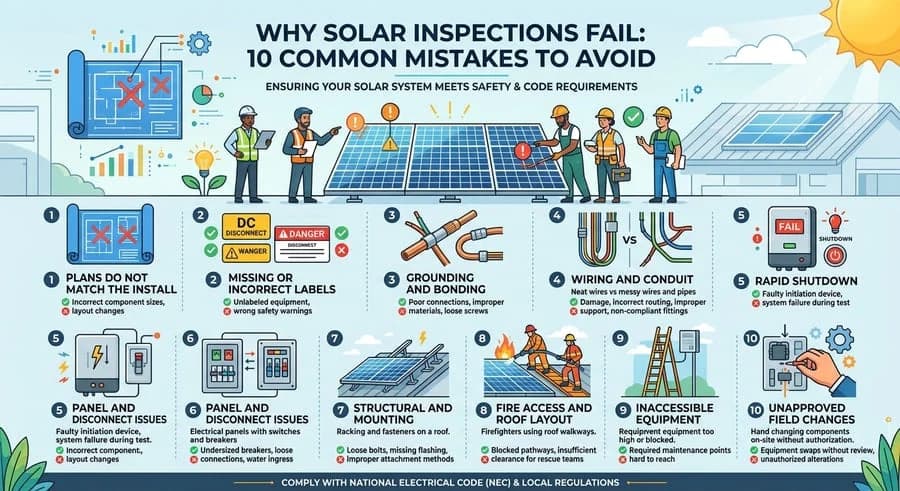
Why Solar Inspections Fail: 10 Common Mistakes to Avoid
Discover the 9 critical reasons solar inspections fail and how to avoid costly m...

Solar Grounding And Bonding: How To Pass Inspection Every Time
Learn how to pass solar grounding and bonding inspections every time. Avoid comm...
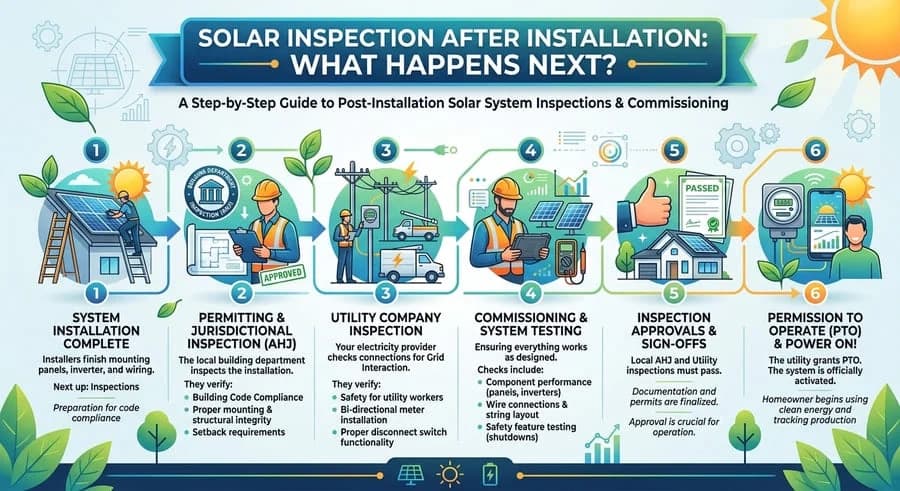
Solar Inspection After Installation: What Happens Next?
Learn how to pass your solar inspection by following essential tips for obtainin...